
If you want Japan SaaS video localization to work, don’t just translate the script. You need Japanese audio or subtitles, a Japan-ready UI in screen recordings, the right business tone, local date and currency formats, and a review process that checks language, timing, audio, and product fit.
I’d sum up the article like this: Japan buyers judge trust fast, and video often shapes that judgment before sales talks begin. Localized content can hold attention 6x better, high-quality audio can improve completion odds by 50%, and many projects cost about $5,000 to $20,000 depending on scope.
Here’s the short version:
- Start before production, not after editing
- Match each video type to the funnel stage
- Use Japanese UI, not English screens with translated captions
- Keep tone formal and consistent across video, product, and docs
- Pick the right format: subtitles, voiceover, dubbing, or re-recording
- Plan for 30% to 50% text expansion in Japanese
- QA every layer: language, subtitle timing, audio, and UI accuracy
- Use localized videos across marketing landing pages, sales, onboarding, and support
- Track business results, not just views
A quick side-by-side makes the format choices easier to see:
| Format | Cost | Speed | Best use |
|---|---|---|---|
| Subtitles | Lowest | Fastest | Webinars, social clips, executive messages |
| Voiceover | Medium | Medium | Tutorials, onboarding, support |
| Dubbing | Higher | Slower | Marketing videos, product explainers |
| Re-recording | Highest | Slowest | Sales demos with Japan-specific UI or flows |
Bottom line: if the video, UI, and wording don’t match the Japan product experience, buyers will notice. This guide explains how to plan, produce, review, and use localized SaaS videos so they help with pipeline, onboarding, and retention.
Build a Localization Strategy Before Production Starts
Before production starts, set a clear plan. The calls you make before a single frame is recorded – which videos to localize, how success will be measured, and who owns each part of the process – shape whether the work helps grow pipeline.
Match Video Types to Each Stage of the Japan SaaS funnel
Not every video needs the same level of spend. A smart place to start is with bottom-funnel product demos tied to high-value enterprise deals, then move to top-funnel awareness content later. Get the high-impact assets right first, then build out from there.
Each funnel stage needs its own format and success metric:
| Funnel Stage | Video Type | Recommended Format | Key Metric |
|---|---|---|---|
| Awareness | Short explainers, social ads | Subtitles or AI dubbing | Reach, click-through rate |
| Evaluation | Product demos, webinars | Full dubbing or voice cloning | Demo-to-trial conversion, win rate |
| Onboarding | Tutorials, setup guides | Dubbing + written manuals | Activation rate, support ticket volume |
| Expansion | Feature releases, training | Dubbing or subtitles | Feature adoption, net revenue retention |
There’s also a Japan-specific detail many teams miss: onboarding videos usually can’t stand on their own. Japanese IT buyers and admins often expect 30–50 page written setup guides alongside video walkthroughs. If the video is the whole package, it may feel incomplete.
Set Goals, Budget, and Format Priorities
Before you pick subtitles, voiceover, or dubbing, decide what you want to improve. That might be demo-to-trial conversion, win rate, activation rate, feature adoption, support ticket volume, or net revenue retention.
Format choice isn’t just a cost call. It also shapes how convincing the video feels. As Mark Rogers of THODEX puts it:
"Product demo videos that close domestic deals lose 40–60% of their persuasion power on international buyers when delivered with subtitles instead of fully dubbed audio."
Subtitles can work well for FAQs, interviews, and awareness content where the speaker’s own presence carries weight. But for demos and marketing videos, dubbing or voice cloning is often the better bet for completion and engagement.
Cost matters too. A Japan video localization project often lands between $5,000 and $20,000, depending on scope and how far the adaptation goes. Hybrid workflows – using AI-powered transcription and translation, then having native speakers review the output – can be a solid middle path. These projects usually run about $50–$150 per minute, compared with $300–$500 per minute for studio voiceover.
Decide Who Owns the Localization Workflow
Localization tends to fall apart when ownership is fuzzy. Marketing, product, sales, and customer success all care about the outcome, but they’re often pulling in slightly different directions. A simple ownership model helps keep things moving:
| Role | Responsibility |
|---|---|
| Marketing | Acquisition content, SEO metadata, brand transcreation |
| Product | UI accuracy in demos, technical validation |
| Sales | Demo scripts, evaluation-stage content |
| Customer Success | Onboarding flow adaptation, support video prioritization |
| Local Reviewers | Final sign-off on honorifics, tone, and cultural accuracy |
If your team doesn’t have in-house Japan experience, an outside partner can take charge of the full workflow and close the gap between language work and go-to-market execution. Nihonium provides Japan localization and go-to-market services for global SaaS companies, including product localization, marketing funnel creation, fractional sales support, and custom market entry strategies tailored to the Japanese market.
As Naoki Togawa of Nikkei Business Publications observed:
"It’s easy to tell which vendors know what they are doing and are really committed to the market just through the quality of their materials."
That quality starts with clear ownership before production begins.
sbb-itb-a752276
Adapt Language, Visuals, and On-Screen Content for Japanese Viewers
Once the strategy is in place, treat the script, voice, subtitles, UI capture, and b-roll as one product experience. Make these calls before recording begins.
Use the Right Business Tone and Consistent SaaS Terminology
Japanese B2B communication depends on steady use of keigo – formal honorific speech that shows respect and professionalism. If you slip into casual speech (tameguchi) in a product demo or onboarding video, it can hurt brand trust. The tone should stay aligned across the video script, product UI, and help docs. It also helps to build a Japanese SaaS glossary before recording starts.
Pick a calm voice that fits the buyer. Japanese viewers often lean toward slower pacing and natural pauses.
Format Subtitles, Voiceover, and On-Screen Text for Readability
Japanese uses three scripts – kanji, hiragana, and katakana – and they don’t all read the same way on screen. Subtitles should break by grammar, not by raw character count, and lines with dense kanji need more reading time.
UI labels, error messages, and on-screen callouts also need more than direct translation. They should be rewritten with the right level of politeness. Japanese users expect interface text to sound natural and precise, not just functional.
Show a Product Experience That Matches Japan Expectations
If your product already has a localized SaaS UI, use it in every screen recording. A demo with Japanese narration over an English interface feels disconnected. It can make the product look unready for the market and weaken trust.
The same rule applies to every detail shown on screen. Dates should use YYYY/MM/DD, currency should appear as ¥ (yen), and name fields should follow surname-before-given-name order. If a demo shows a sample customer named "John Smith" with a date like 06/27/2026, Japanese viewers will spot it as foreign right away. UI text, dates, currency, and sample data aren’t background details. They’re part of the demo itself.
"The Japanese team says the examples don’t make sense for their market. This is the gap between video translation and video localisation." – XTM Content Team
Visual choices matter too. Use Japanese workplace scenes and muted blues or grays. Generic stock footage and bright, saturated colors can make the piece feel off and weaken trust. Once the script, UI, and visuals line up, the workflow can move into QA.
Run a Localization Workflow from Audit to Final Delivery
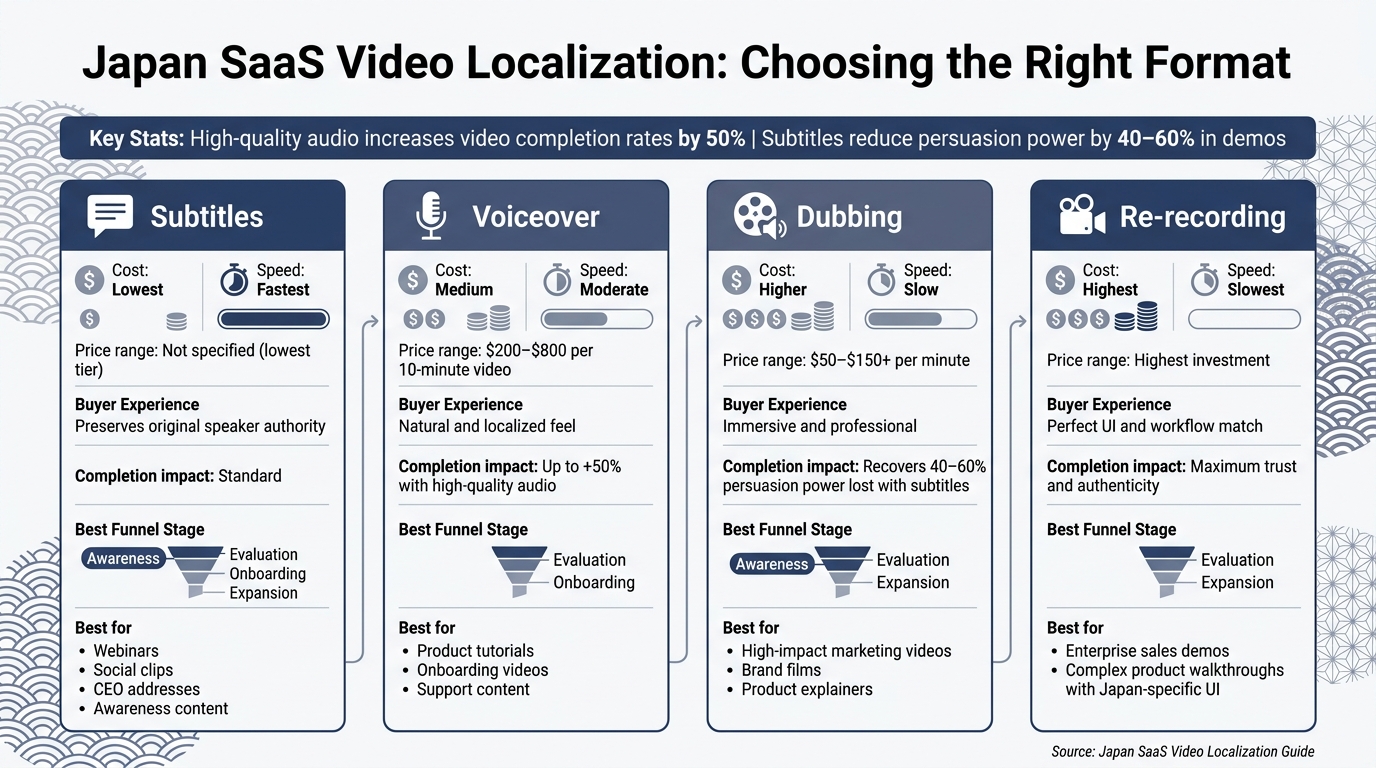
Japan SaaS Video Localization: Format Comparison Guide
After you’ve adapted the language, visuals, and on-screen content, the next step is production and QA.
Follow the Localization Steps from Audit to Delivery
Start with an audit of your existing English videos. Flag every asset with hardcoded text or UI strings, and note how much room the source files give you for layout changes. Once you have that inventory, rank videos by business impact. Product demos, onboarding flows, and pricing screens should come before niche support clips. That keeps the production plan tied to business goals before anything moves into SaaS localization for Japan.
Next, pull scripts and editable source files. Then adapt them into Japanese with proper keigo and your SaaS glossary. Add subtitles or record voiceover, then replace the visuals with localized versions. If the Japanese product flow differs from the global version, re-record the demo instead of forcing a mismatch on screen.
You’ll also want to plan for 30–50% Japanese text expansion. That affects subtitle length and on-screen layout, so build that buffer into the editing schedule before production begins.
Apply QA Checks for Language, Timing, Audio, and Product Accuracy
QA for Japan-localized video has four separate layers. Skip one, and problems tend to show up later.
- Linguistic review: Check honorifics, terminology, and phrasing for consistency.
- Subtitle timing: Review every subtitle cue by hand.
- Audio quality: Verify loudness against Japanese broadcast standards and make sure the voiceover tone fits the audience.
- Product accuracy: Confirm that every visible UI element matches the live Japanese product, including screenshots tied to local workflows and payment methods.
Set aside extra time for local stakeholder review before final sign-off.
Each check should confirm the choices made in script, UI, audio, and layout before delivery.
Compare Subtitles, Voiceover, Dubbing, and Re-Recording Options
The right audio-visual method depends on where the video sits in your funnel and how far the Japanese product experience differs from the global one. High-quality audio alone increases the chance that a viewer watches to completion by 50%. So this choice affects engagement in a direct way.
| Method | Cost | Speed | Buyer Experience | Best-Fit Use Case |
|---|---|---|---|---|
| Subtitles | Lowest | Fastest | Preserves original speaker authority | Webinars, social content, CEO addresses |
| Voiceover | $200–$800 / 10-minute video | Moderate | Natural and localized feel | Product tutorials, onboarding, support videos |
| Dubbing | $50–$150+ per minute | Slow | Immersive and professional | High-impact marketing videos, brand films |
| Re-recording | Highest | Slowest | Perfect UI/workflow match | Enterprise sales demos, complex product walkthroughs with Japan-specific UI |
If you’re managing a growing video library, AI dubbing with native review can help keep output moving without losing language quality.
Once assets are approved, publish them to CRM-linked libraries, sales decks, and local platforms. Make sure the final masters meet Japanese delivery specs. Then distribute approved masters to the channels and teams that will use them, so the same assets can support marketing, sales, onboarding, and support.
Put Localized Video to Work Across Marketing, Sales, Onboarding, and Support
Once production is done, the next step is simple: put each localized video into the Japan-facing workflow where it can do the most good.
Use Localized Video in Japan-Focused Marketing and Sales Workflows
After approval, assign each video to the funnel stage where it can have the biggest effect.
For marketing, YouTube is a major channel for B2B research in Japan. People often watch product explainers and case studies long before they talk to sales. It also helps build local trust and supports SEO because Google’s AI Overviews in Japan give extra weight to multimedia content. That means your localized video can’t feel like an afterthought. The tone, terminology, and UI details need to match what you set during production.
The same asset can work at more than one stage, but the angle should shift. A discovery-stage viewer may want a clear overview. A buyer doing internal review may need proof, detail, and product accuracy.
For sales, demos should reflect the live Japanese product, not a generic global version. That’s a big deal. If the video shows one thing and the buyer sees another in the product, trust can slip fast. Sales content also needs to fit the ringi consensus-building process, where team leads pass materials up to senior stakeholders for review. So keep these videos factual, organized, and easy to share internally. Flashy edits won’t do the heavy lifting here.
Localized onboarding also helps cut friction and churn. If a customer signs up after seeing polished Japanese video, then lands in onboarding or support content with mismatched terms, the whole experience starts to wobble. Use the same glossary and interface language across onboarding, support, and help content to keep post-sale continuity in place.
Track Results and Improve the Video Library Over Time
Track results by funnel stage, not just by video format.
| Goal | Primary KPIs | Metric Effect |
|---|---|---|
| Funnel Conversion | View-through rate, demo-request rate | Higher completion rates |
| SaaS adoption | Activation rate, feature adoption | Faster onboarding, lower churn |
| Customer Retention | Renewal rate, customer health score | Users are less likely to renew without native-language support |
| Support Efficiency | Deflection rate, ticket volume | Fewer inbound support tickets |
Tie your localized demo library to your CRM so you can see which videos line up with closed-won deals. Then judge each asset based on the job it was meant to do. If a video helps move deals, improve adoption, or cut support load, that’s where deeper localization spend makes sense.
Conclusion: Key Rules for Japan SaaS Video Localization
Japan SaaS video localization works best when a few core decisions stay consistent from first touch to post-sale use. Start by prioritizing videos based on business impact before production begins. Then match the language, visuals, and UI to what Japanese users see in the product. Check every asset against the live Japanese version before release. After launch, measure performance so the library keeps getting better instead of sitting there and aging out.
"75% of Japanese business users will not renew a SaaS subscription without Japanese-language post-sale support – making localization a retention requirement, not a nice-to-have." – Yuga Koda, Co-Founder, Nihonium
If your team needs help tying localization to a broader Japan go-to-market plan, Nihonium works with global SaaS companies on integrated localization, marketing funnel creation, and fractional sales execution built for the Japanese market.
FAQs
Which videos should we localize first for Japan?
Start with the videos that matter most across the buyer journey:
- Feature demos
- Implementation guides
- Training materials
Use native voice-overs and formal Japanese (keigo) subtitles to match local business expectations.
When should we choose dubbing over subtitles?
Choose dubbing for ads or entertainment content when emotion and viewer interest matter most. It also works well for complex offers that need the clearest possible message.
If a video ad is already doing well in your market, dubbing can be a smart next step. It can help increase watch time and make the message easier to follow.
How do we QA Japan-localized SaaS videos?
Use a two-layer QA process.
First, check that UI elements, text encoding, and subtitles display the right way across devices and platforms. You also need to make sure Japanese subtitles have enough room on screen and enough time for people to read them at a natural pace, without awkward line breaks or flashing.
Then ask native Japanese SaaS professionals to review the tone, honorifics, and industry terms. That extra pass helps catch formality issues and phrasing that sounds off, so the final video feels natural in Japanese instead of sounding like a direct translation.
Related Blog Posts
- AI in Japan SaaS: Market Insights
- B2B SaaS Video Marketing in Japan
- Translation vs. Localization: What Works for Japan
- How Japanese Culture Shapes SaaS Messaging
 Japanese
  English